One endpoint. Every model. Tokens saved automatically.
9RouterX is a local AI gateway and LLM router in one Go binary. Point
Claude Code, Codex, Cursor, or any OpenAI- or Claude-compatible CLI at one endpoint and
get automatic fallback across subscription, cheap and free tiers — with a
token-saver suite that cuts tool-output tokens by 20–40% and the management
dashboard embedded.
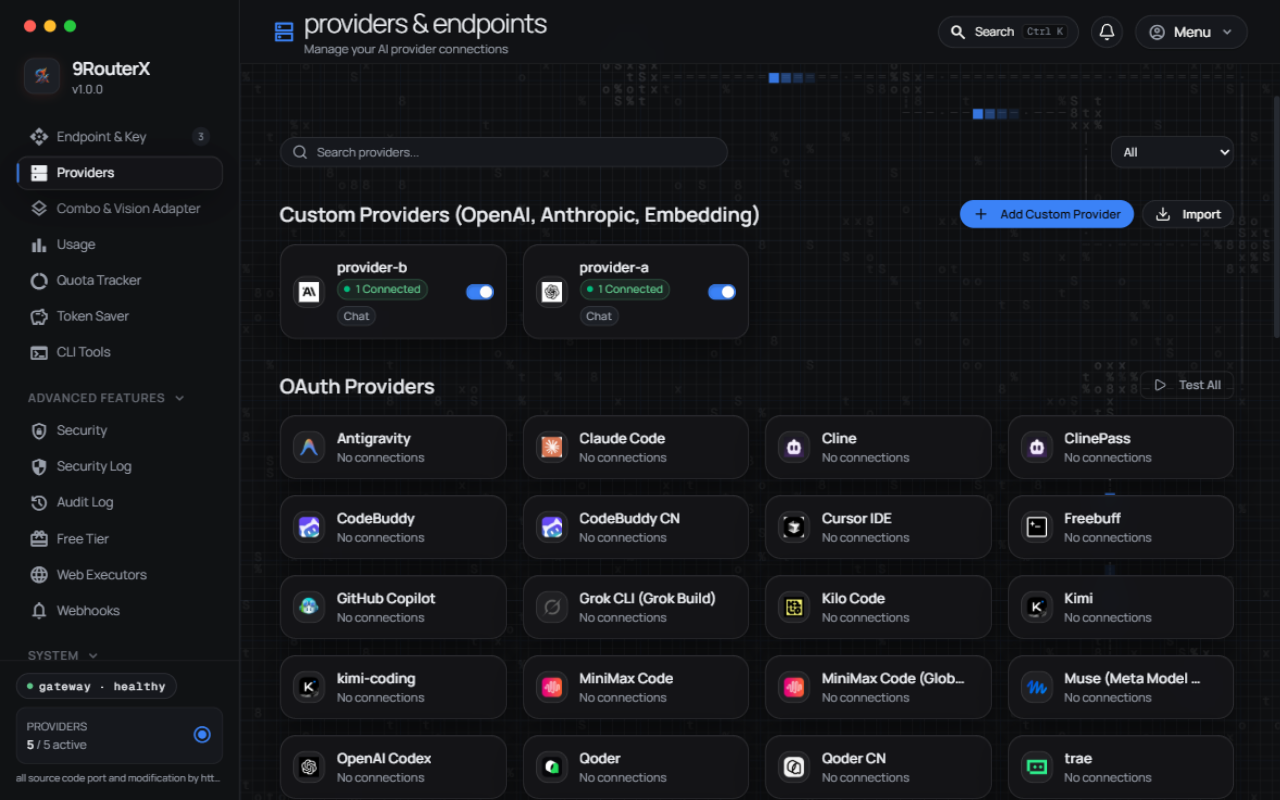
The Providers page — the dashboard embedded in the same binary you just installed.
What you get
Four systems between your CLI and the bill
The condensed version of the feature list — the README below carries the full
inventory, and the wiki documents every knob.
01
RTK Token Saver
Auto-compresses tool_result content — git diffs, grep output,
file listings — before it reaches the model: 20–40% fewer tokens on
agentic workloads. Anti-slop injector, context squeezer, per-tool output filters
and JSON guard ride along.
02
Semantic cache + prompt cache
Repeated identical requests are served from cache instead of the provider, cutting
cost and latency for multi-agent loops and CLI re-runs. Semantic hits are
attributed in usage analytics; the prompt cache is a bounded LRU on the exact
prompt.
03
Guardrails & per-key governance
Daily cost ceilings with hard cutoff, request limits, IP whitelists, per-key system
prompts and endpoint permissions — enforced per API key, with a security
event log, SSRF guard and audit log v2 behind them.
04
Multi-provider routing
A 3-tier circuit breaker across the subscription → cheap → free chain,
with per-combo strategies: fallback, round-robin, sticky, capacity, fusion,
cache-optimized, auto, quota-weighted and reset-aware.
Quickstart
Install, run, point your CLI
Defaults are enough for most people — port 20128, data in
~/.9router, no flags needed.
Install
One line, any OS — npm installs the right binary for your platform
automatically (Windows, macOS Intel/Apple Silicon, Linux x64/ARM64). Requires
Node.js 18+; the gateway binary itself has no runtime dependencies.
Anything that speaks OpenAI Chat Completions, Claude Messages, Responses, or
Ollama-compatible chat. The
wiki's client setup page has per-tool snippets.
client settings
Endpoint: http://localhost:20128/v1
API Key:  [Settings → API Keys in the dashboard]
Model:    kr/claude-sonnet-4.5
FAQ
Questions the docs answer most
The README's own FAQ — every answer below is documented in full there and in the
wiki.
Is 9RouterX really free?
Yes — MIT-licensed and free to run. The gateway itself costs nothing; you
bring your own provider accounts, and its whole design pushes traffic toward the
free and cheap tiers (the free-tier catalog, the circuit breaker, and per-key
budget ceilings all serve that goal).
Does it work with Claude Code, Codex, Cursor, or Cline?
Yes — anything that speaks the OpenAI Chat Completions API, the Claude
Messages API, the Responses API, or Ollama-compatible chat points at
http://localhost:20128/v1 with an API key minted in the dashboard. The
wiki's client setup page has per-tool snippets.
How is this different from running Ollama?
Ollama serves local models. 9RouterX is a router in front of cloud and subscription
providers — it fails over between your subscription quota, cheap paid models,
and free tiers, and adds token compression, caching, and per-key governance on
top. The two compose fine: an Ollama endpoint can be one of the providers.
Do I have to migrate my data from 9Router?
No. Point 9routerx at the same DATA_DIR and it opens the same SQLite
database — providers, combos, keys, and history carry over as-is. There is
no import step and no migration.
Can I limit what a shared API key can do?
Yes — that is the per-key governance suite: daily cost ceilings with hard
cutoff, request limits, IP whitelists, per-key system prompts, and endpoint
permissions, optionally templated via plans and stamped across many keys.
9RouterX — FREE AI Router & Token Saver (Single Binary)
A local AI gateway and LLM router in one Go binary: connect Claude Code, Codex, Cursor, Antigravity, Gemini, OpenCode, Cline, OpenClaw... to 40+ AI providers & 100+ models — with automatic fallback across subscription, cheap and free tiers, per-key governance, and a token-saver suite that cuts tool-output tokens by 20-40%. No Node.js needed at runtime.
Custom usage ranges — analyze any window (14d, 12h), not just fixed presets
Extended logging — live console log with level filters & search, plus per-request payload inspector
Single binary — Go + embedded dashboard, works with Claude Code, Codex, Cursor, Cline, any CLI tool
What's different from 9Router / 9router-go?
9RouterX is a fork of 9router-go (luqman-v1), which is itself a Go port of 9Router — full credit and attribution live in Acknowledgments and ATTRIBUTION.md. On top of that lineage, 9RouterX adds:
Single Go binary, zero runtime deps — proxy APIs + Svelte 5 dashboard embedded in one executable; no Node.js process to keep alive.
Per-key governance — daily cost ceilings with hard cutoff, request limits, IP whitelists, per-key system prompts, endpoint permissions, and reusable plan templates you can stamp onto many keys.
The full token-saver suite — beyond RTK compression: anti-slop injector, context squeezer, tool-call repair fallback, JSON guard, per-tool output filters, and the Caveman & Ponytail output styles.
New routing strategies — cache-optimized, auto, quota-weighted, and reset-aware combo routing, plus a 3-tier circuit breaker across subscription, cheap, and free tiers.
Semantic cache + prompt cache — repeated identical requests are served from cache, cutting cost and latency for multi-agent loops and CLI repetition.
MCP server + A2A endpoints — wire agentic tooling (IDE assistants, agent-to-agent clients) straight into the gateway.
Security log + hardening — per-event security log with alerting, SSRF guard with PII masking, TLS stealth, and audit log v2.
Indonesian & English dashboard — built for the t.me/aiclub_id community first, with a desktop tray companion and a one-command Cloudflare tunnel for remote access.
The npm launcher installs the right binary for your OS automatically (Windows, macOS Intel/Apple Silicon, Linux x64/ARM64). Requires Node.js >= 18; the gateway binary itself is a single Go executable with no runtime dependencies.
Alternative — script installer (same binaries):
# macOS / Linux
curl -fsSL https://raw.githubusercontent.com/yanstd888/9routerx/main/install.sh | bash
# Windows (PowerShell — installer writes to %LOCALAPPDATA% + user PATH, no admin needed)
irm https://raw.githubusercontent.com/yanstd888/9routerx/main/install.ps1 | iex
Then start it (defaults: port 20128, data ~/.9router — no flags needed):
Already using upstream 9Router? Drop-in compatible: same default port 20128 as 9router / 9router-go — point your existing client at 9routerx with zero config changes. 9routerx opens the same DATA_DIR/db/data.sqlite too: your providers, connections, combos, API keys, and usage history carry over as-is. No import step, no migration. See Sharing a database with 9Router for the caveats.
Keep the terminal free (background mode):
9routerx start          # same as: 9routerx --background   (or -d)
9routerx status         # is it running? (pid, dashboard, log)
9routerx restart        # replace the running daemon
9routerx logs -n 100    # tail the background log
9routerx stop           # stop it
The detached process records itself in DATA_DIR/run/gateway.pid and writes its
output to DATA_DIR/run/gateway.log. A second start while one is running
refuses instead of fighting over the port, and a daemon killed from Task Manager
leaves nothing behind: the stale pid file is cleaned on the next command.
Windows stops the process with TerminateProcess instead of SIGTERM, so
stopping skips the graceful drain; use the dashboard's Shutdown button or
9routerx restart when you want in-flight streams to finish first.
Start on boot (autostart):
9routerx service install     # systemd user unit, launchd agent, OpenRC/runit service, cron @reboot, or a Windows logon task
9routerx service status      # which backend owns the entry, and whether it is enabled/active
9routerx service start       # start the supervised service now (falls back to the background daemon)
9routerx service restart     # restart it
9routerx service stop        # stop it now but keep it enabled for boot
9routerx service uninstall   # remove the autostart entry
install picks the native backend for the host. systemd, launchd, and cron all
install into the user scope and need no root; runit's ~/service path too.
Two exceptions: OpenRC is a system service and needs root (service install
refuses without it — run with sudo, or pick --backend cron), and on Windows
install registers a scheduled task via schtasks, which requires an
Administrator console. The Windows task runs as the current user at logon, so it
reads that user's data dir rather than SYSTEM's. Force a backend with
--backend systemd|launchd|openrc|runit|cron.
2. Connect a FREE provider (no signup needed):
Dashboard → Providers → Connect Kiro AI (~50 credits/month free) or OpenCode Free (no auth) → Done!
3. Use in your CLI tool:
Claude Code / Codex / OpenClaw / Cursor / Cline Settings:
  Endpoint: http://localhost:20128/v1
  API Key:  [Settings → API Keys in the dashboard]
  Model:    kr/claude-sonnet-4.5
That's it! Start coding with FREE AI models.
Alternatives:
# Docker — no build needed
docker run -d --name 9routerx --restart unless-stopped \
  -p 20128:20128 -v "$HOME/.9router:/data" \
  -e PORT=20128 -e DATA_DIR=/data \
  -e INITIAL_PASSWORD=your-secure-password \
  ghcr.io/yanstd888/9routerx:latest

# Manual download — pick your file, no command line guesswork:
# Windows → .exe | Mac M1+ → darwin-arm64 | Mac Intel → darwin-amd64
# Linux VPS → linux-amd64 | Raspberry Pi → linux-arm64
RTK input compression — auto-compress tool_result content (git diffs, grep output, file listings) before it reaches the model; 20-40% fewer tokens on agentic workloads.
Anti-slop injector — strips the filler phrases and sycophantic patterns that inflate every response.
Context squeezer — older conversation turns are elided with an honest marker to fit a model's context window, keeping the most recent turns verbatim.
Tool-call repair fallback — malformed tool arguments are repaired, truncated JSON is closed, and orphaned tool results are dropped before they become an upstream 400.
JSON guard — non-finite numbers and JSON-shaped hazards are sanitized on every lane.
Per-tool output filters — 50+ ready-made filters for git diff, grep, docker logs, npm install, terraform plan, and friends, so one noisy tool doesn't tax every turn.
Output styles — Caveman and Ponytail directive modes re-shape compressed output for even heavier savings.
Semantic cache + prompt cache — identical requests are served from cache instead of the provider: repeated multi-agent probes and CLI re-runs stop paying twice. Semantic hits are attributed in usage analytics; the prompt cache is a bounded LRU keyed on the exact prompt.
GCF compression — dashboard assets ship pre-compressed (.br/.gz) for a fast first paint.
Governance & security
Per-key governance — daily cost ceiling (USD per UTC day) with optional hard cutoff, request limits with reset windows, RPM/TPM/concurrency caps, and alert thresholds — enforced per API key, not per server.
Plan templates — bundle limits into a reusable plan and stamp it across many keys; key-level overrides win.
IP whitelist per key — a key only works from the addresses (IP/CIDR list) you allow.
Per-key system prompt & endpoint permissions — inject a system prompt per key in the client's wire format, and restrict which endpoint families (chat, embeddings, images, ...) a key may call.
Security event log — per-event security log with alerting on suspicious patterns, plus a compliance-grade audit log v2.
SSRF guard + PII masking — outbound dialing and inbound payloads are guarded; private-network escapes are opt-in flags.
3-tier circuit breaker — per-provider breaker + per-account semaphore across the subscription → cheap → free chain: dead accounts stop receiving traffic on evidence, not on hope.
TLS stealth — hardened TLS fingerprint handling for providers that grade their clients.
Integrations
MCP server — Model Context Protocol over stdio (IDE integrations) and HTTP POST (remote callers), with a scoped auth token: browse providers, read usage, and run operator actions from your agent.
A2A endpoints — Agent-to-Agent protocol surface (agent card + message/send, tasks/*) so other agents can consume the gateway directly.
Telegram notifications + multi-target webhooks — push gateway events to Telegram and to any operator-configured webhook fleet.
Notification feed — condition scanners watch system and key health and write a dashboard feed, with fan-out to the webhook targets.
Teams billing — multi-seat team plans with shared budgets.
Config bundle import/export — move a whole configuration between installs as an encrypted bundle (AES-256-GCM under ROUTER_MASTER_KEY).
Tray companion — 9routerx-tray puts start/stop/status in the menu bar on Windows, macOS, and Linux.
Cloudflare tunnel — one command exposes the dashboard through a named cloudflared tunnel, no port-forwarding dance.
Web executors — optional browser-session executors (ChatGPT web, Gemini web with background session renewal) for accounts that only exist in a browser.
(Indonesia) Indonesian & English dashboard — full i18n for both languages (Bahasa Indonesia dan Inggris), switchable in settings.
Ops & reliability
Usage analytics — live SSE usage + console-log streams, cost display in USD/IDR/EUR and ten more currencies (editable rate table), custom analysis windows, and cache-hit attribution.
Model health + scheduled auto-ping — models you actually use are probed automatically, consecutive failures are counted, and dead models drop out of routing; scheduled pings keep idle connections warm.
Uptime heartbeat — push a heartbeat to Uptime Kuma (or any Push-Monitor-compatible endpoint) so you learn about downtime from your monitor, not from a CLI tool that stopped answering.
Codex quota tracking — watch Codex quota consumption and reset-credit windows from the dashboard.
Backup/restore — database backups and restores are dashboard features, not shell rituals.
Command palette + bulk operations — every dashboard action reachable from a palette; bulk-add providers, keys, and models instead of clicking through one-by-one.
Free-tier catalog + custom credits — browse a built-in free-tier provider catalog and track custom credit balances per account.
Routing strategies — per-combo fallback, round-robin, sticky, capacity, fusion, plus cache-optimized, auto, quota-weighted, and reset-aware strategies.
Per-combo response timeout & grace period — a model that hangs is skipped and briefly benched; see the wiki's combos page for the details.
SQLite WAL persistence — single-file storage with WAL concurrency, outbound proxy support, self-update, MITM commands, Docker, and cross-compilation.
Sharing a database with 9Router
Already running 9Router (the Next.js version)? 9routerx reads that exact database. There is no import, no export, and no migration step.
Both projects default to the same file and speak the same schema:
Path
macOS / Linux
~/.9router/db/data.sqlite
Windows
%APPDATA%\9router\db\data.sqlite
Docker
/data/db/data.sqlite inside the container
Stop 9Router, start 9routerx, and log in with your existing password. Your provider connections, proxy pools, combos, API keys, model aliases, and usage history are all there — 9routerx's own dashboard renders them, because it is the same data.
You don't even have to stop 9Router if you want to keep the Node.js dashboard around. Run 9routerx on a different port against the same DATA_DIR:
# Both gateways now default to :20128 — give 9routerx an explicit
# different port (any free one works) to run side by side:
PORT=20129 DATA_DIR=/home/you/.9router 9routerx
Both read the same tables, so a connection you add in either dashboard shows up in the other. SQLite serialises the writes; the supported setup is one active writer, so avoid editing the same combo or settings entry in both at the same moment.
Running it the other way round (9routerx first, then pointing 9Router at the same directory) works the same way. 9routerx will have added two columns to providerConnections (lastUsedAt, consecutiveUseCount) and one extra table (upstream_leases). Upstream ignores both — its schema sync is additive and doesn't drop unknown columns — so nothing breaks.
What 9routerx will not do:
Import a legacy JSON export. If your 9Router data still lives in old JSON files, start upstream once to convert them, then switch.
Run destructive migrations or pre-migration backups. Its bootstrap only ever adds — create missing tables, add missing columns, seed missing rows. It never drops or retypes.
Interpret _meta.schemaVersion. It's upstream's migration bookkeeping. A database written by a much newer 9Router release should be checked before you rely on it.
Take a backup first if the database matters:
cp -r ~/.9router/db ~/9router-db-backup # stop the daemon first — see DATABASE.md
Full schema, operator contract, and multi-process limits: DATABASE.md. Routing internals: ARCHITECTURE.md.
Screenshots
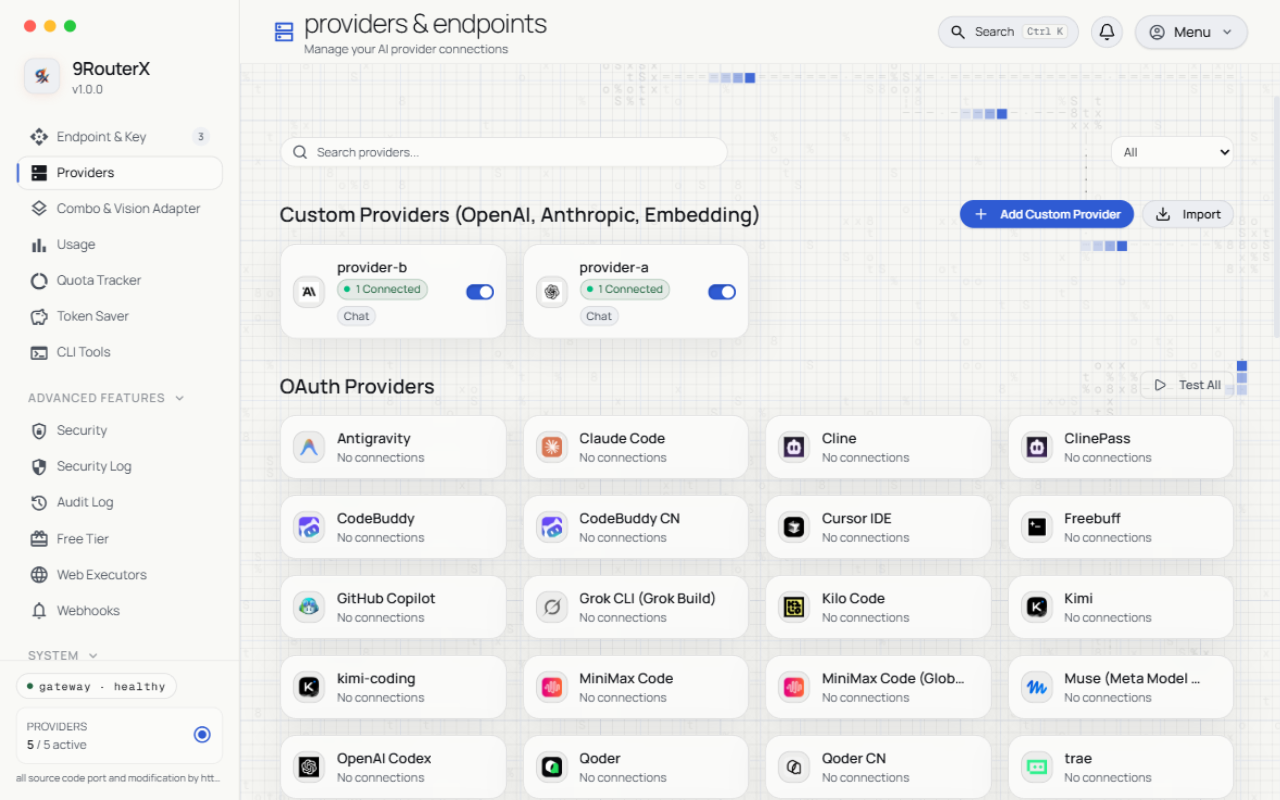
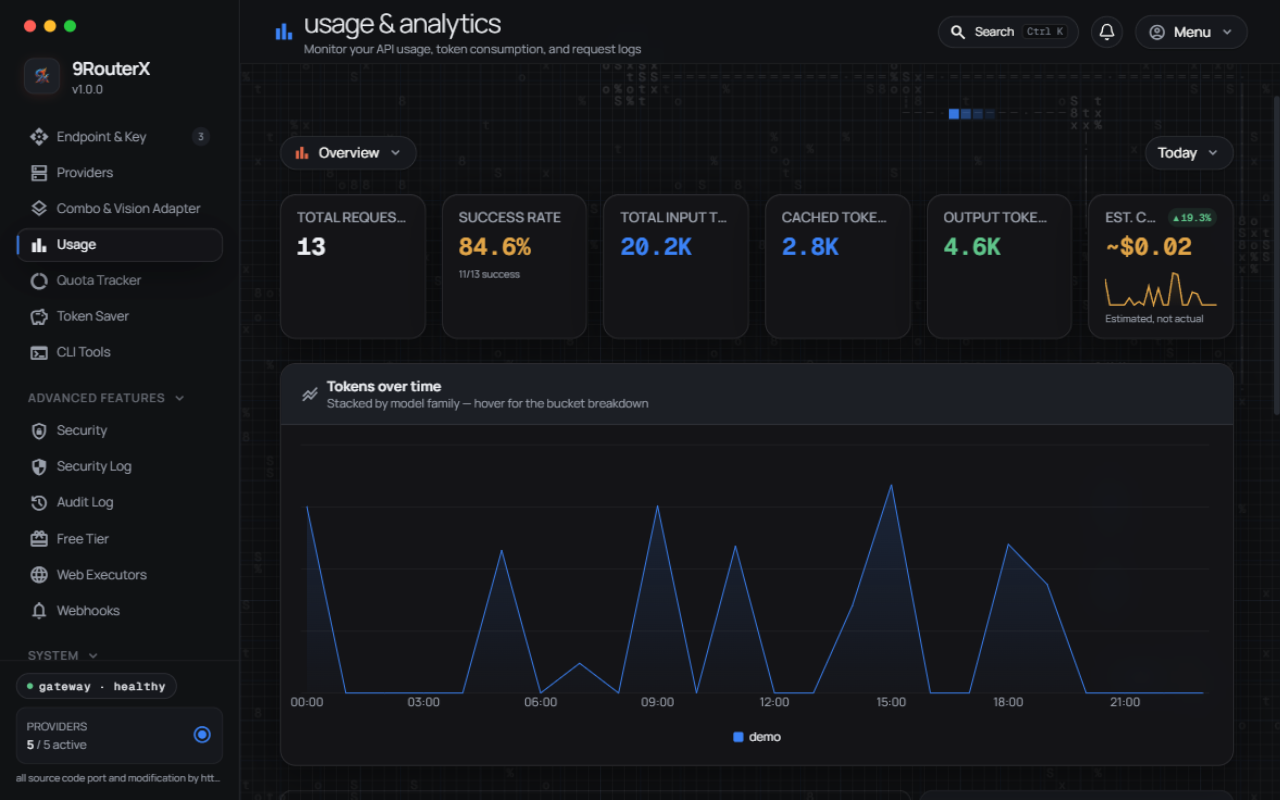
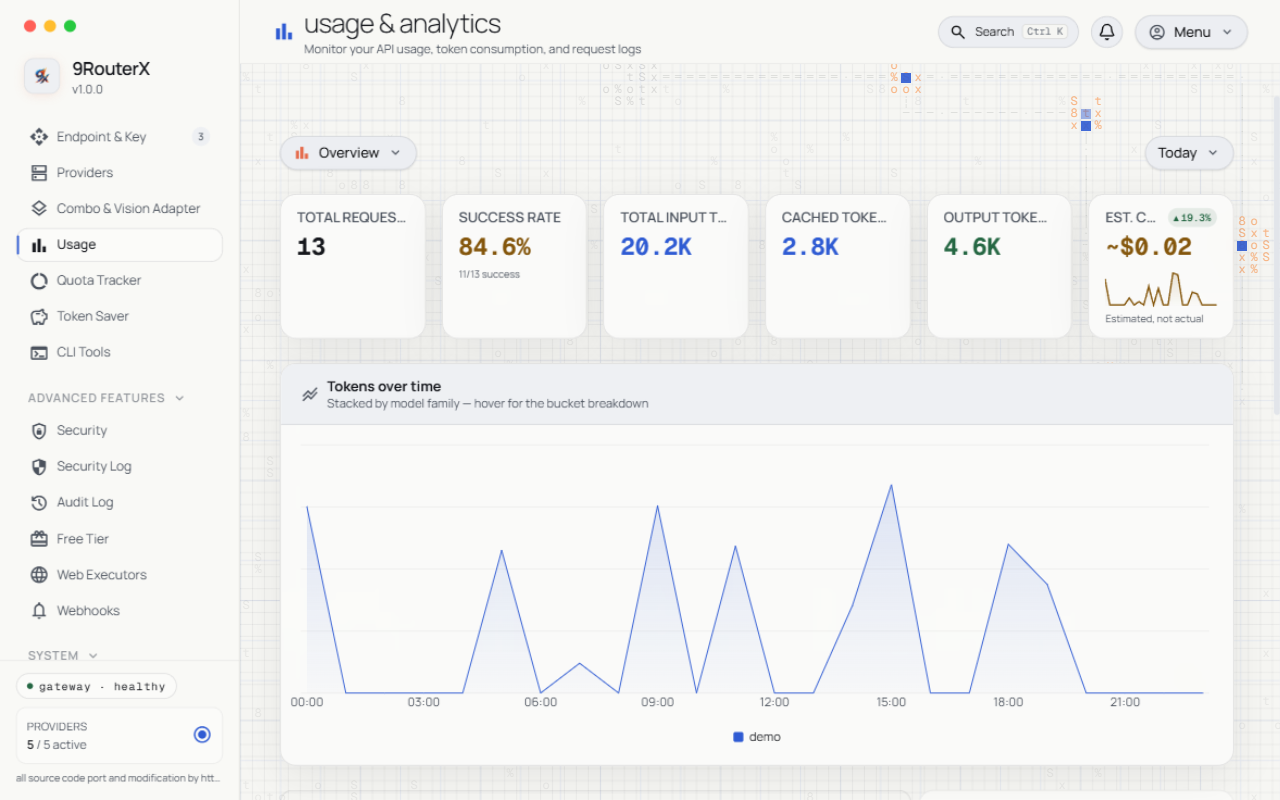
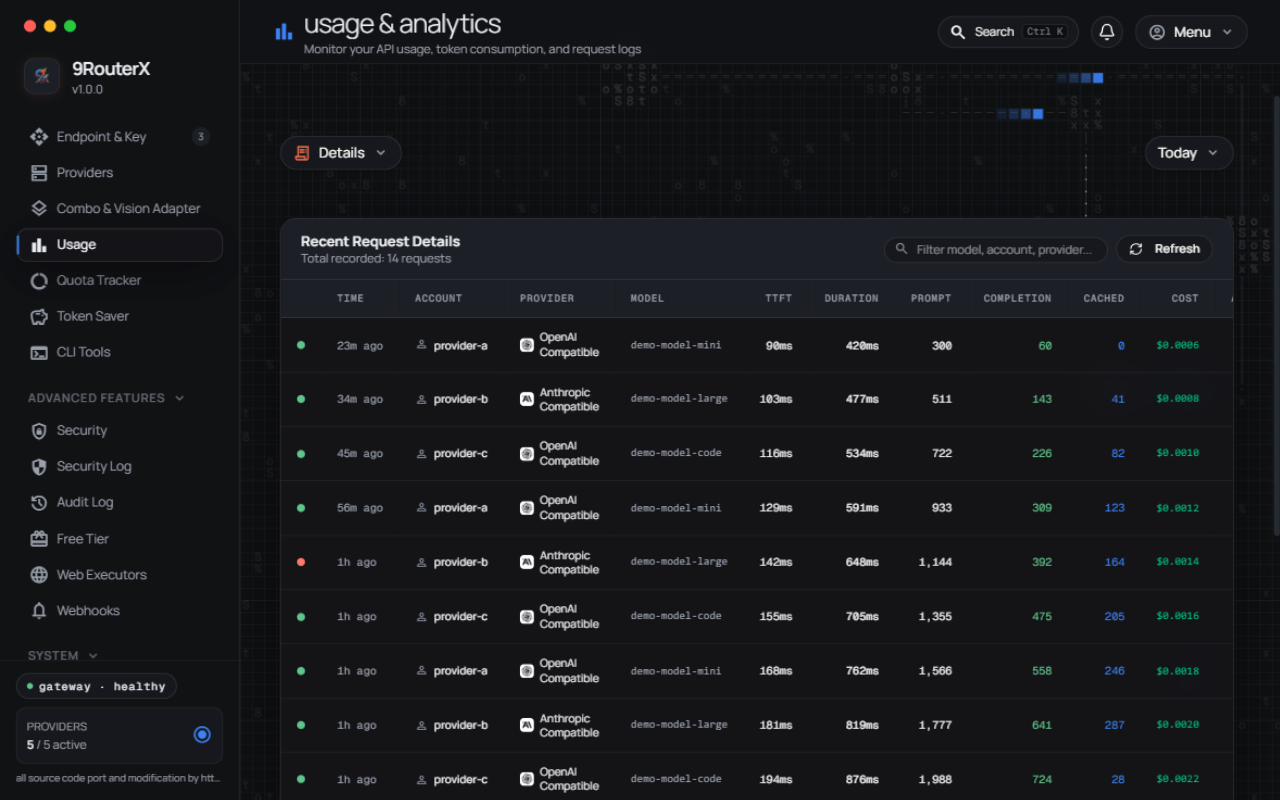
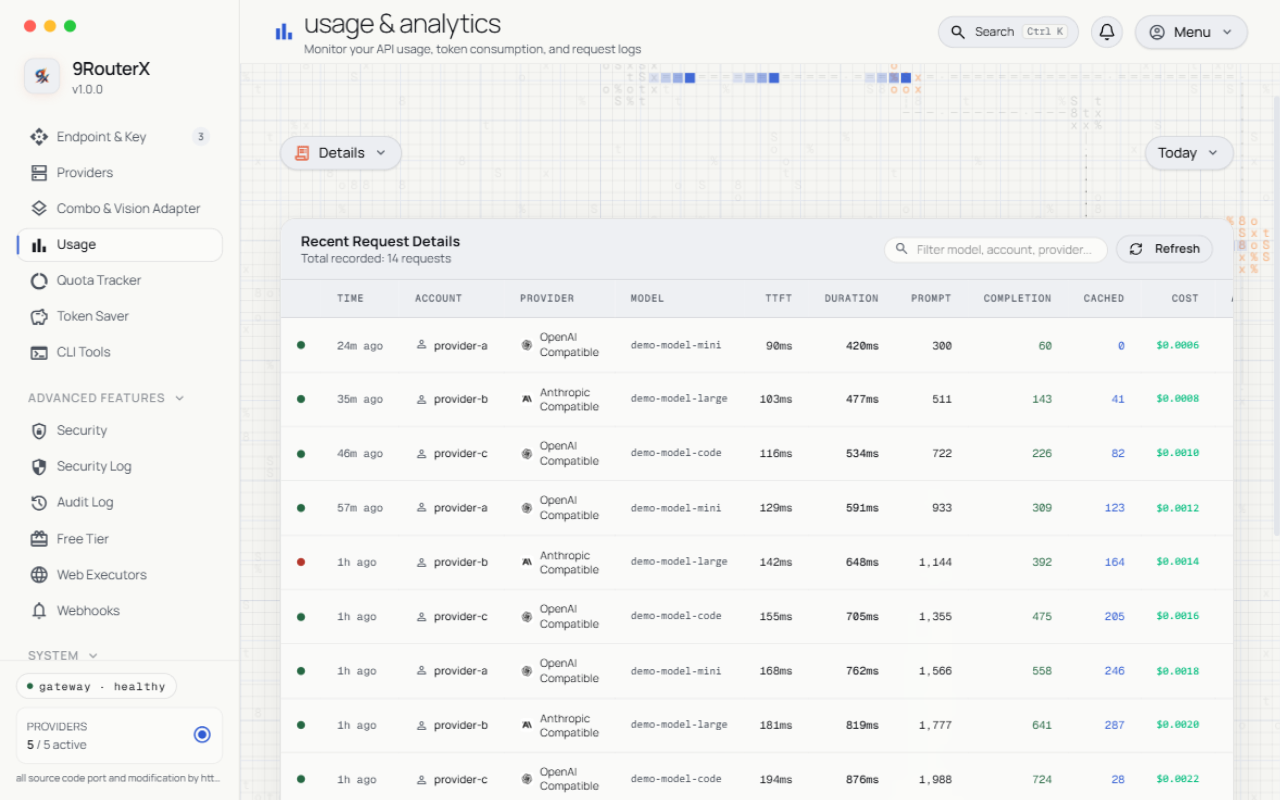
Every screen ships in dark and light themes, at desktop and mobile widths. The
full gallery — with per-page commentary — lives on the wiki's
Screenshots page.
Dark
Light
Providers — connect AI providers and manage custom OpenAI/Anthropic-compatible endpoints
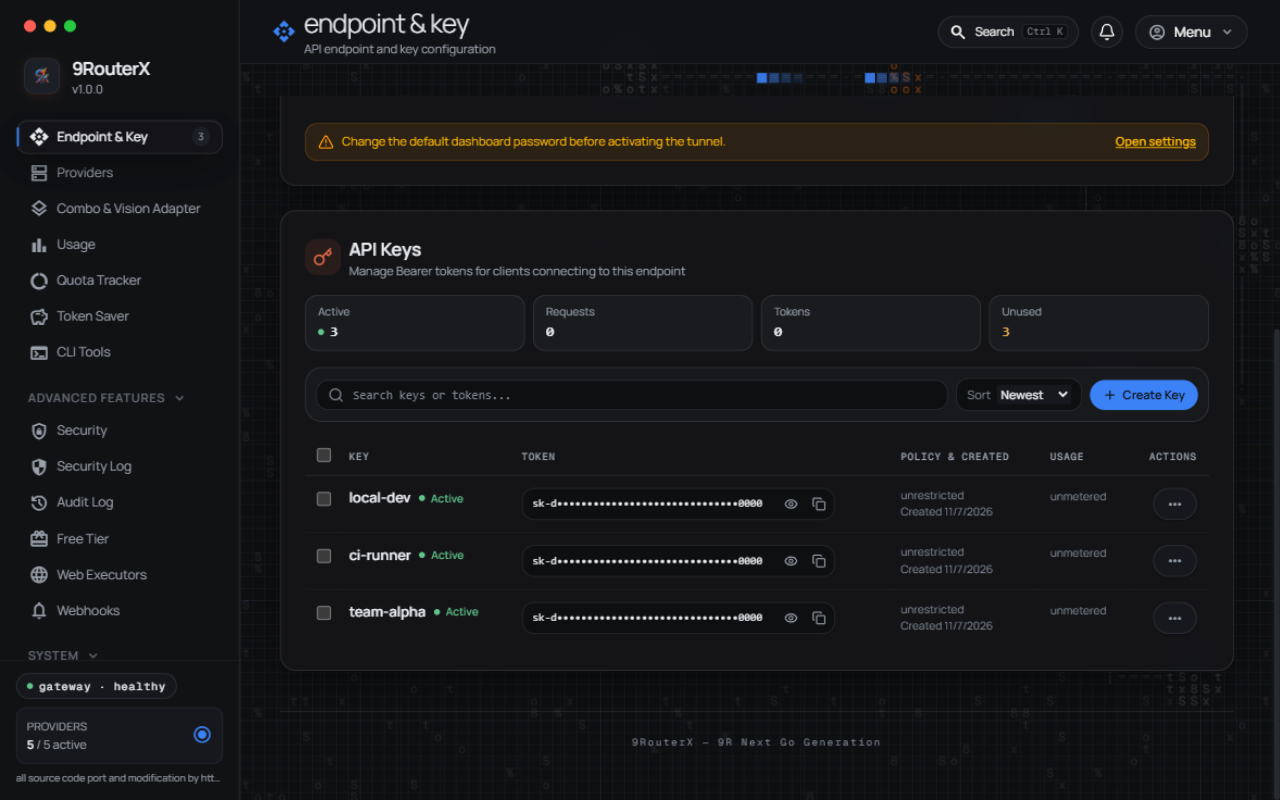
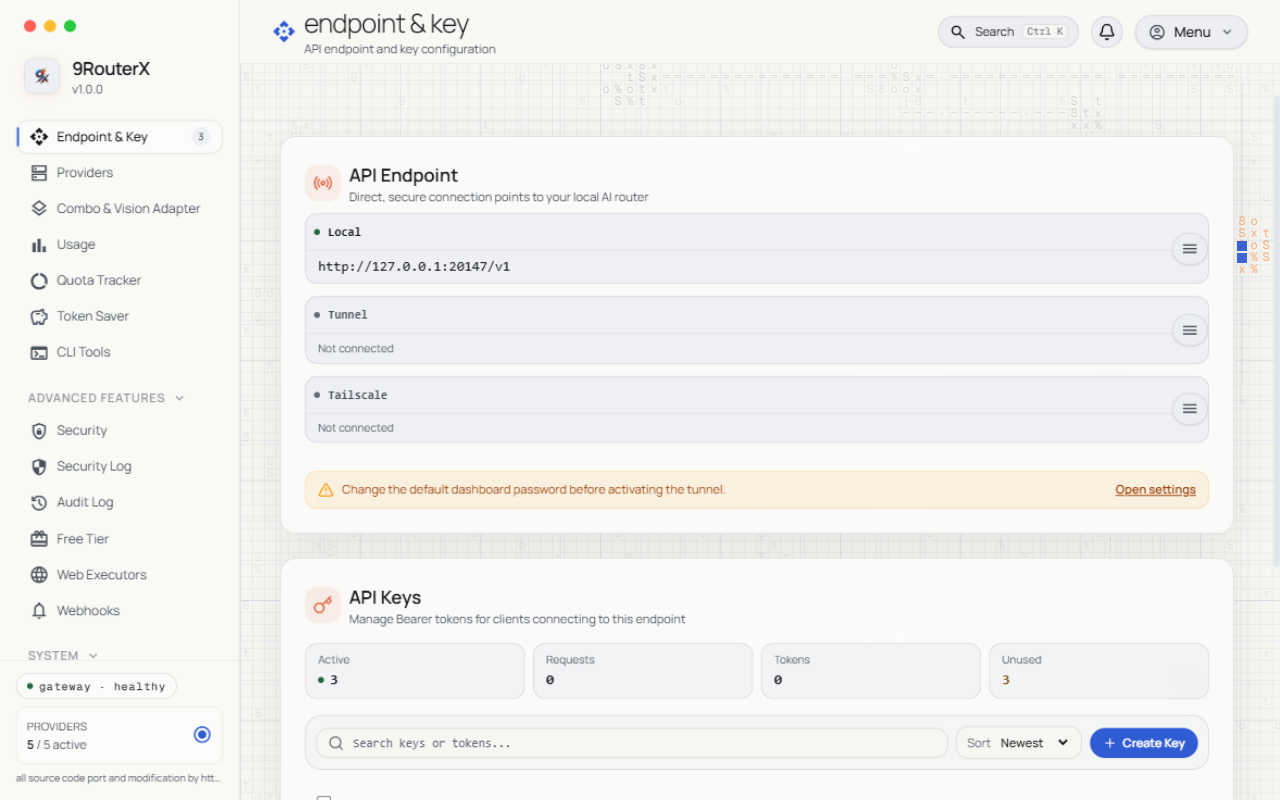
Endpoint & API keys — the OpenAI-compatible endpoint your CLI tools point at, and the keys they authenticate with
Usage overview — live cost, tokens, and per-provider breakdown
Request logs — per-request payload inspector and live console
Mobile layouts reflow the same pages behind a navigation sheet — see
docs/screenshots/ for the full set, including
*-mobile.png (dark) and *-mobile-light.png (light) variants of every page.
Setup Guide
Requirements
npm install: Node.js >= 18 (engines.node of the 9routerx package). The launcher installs the right binary for your OS automatically; the gateway binary itself is a single Go executable with no runtime dependencies.
Supported platforms: Windows x64, macOS Intel (x64), macOS Apple Silicon (arm64), Linux x64, Linux ARM64 — the five @yanstd888/9routerx-<os>-<arch> platform packages (optionalDependencies).
Release binary
Download from GitHub Releases, verify against SHA256SUMS.txt.
Experimental builds
Unreleased work also ships as experimental builds. They are published
separately and are never offered to a normal install:
GitHub Releases marks them Pre-release, so releases/latest — the URL
9routerx update falls back to — keeps pointing at the stable version.
GHCR tags them exp (ghcr.io/yanstd888/9routerx:exp), never latest.
docker pull ghcr.io/yanstd888/9routerx:exp
Opt in only if you want to help shake out bugs. 9routerx update will not
install one over a stable release — grab the asset for your platform from the
pre-releases page and
replace the running binary with it.
Build from source
Prerequisites: Go 1.27 and Bun 1.x (dashboard is embedded into the binary, so build web first):
git clone https://github.com/yanstd888/9routerx.git
cd 9routerx
make web-build   # bun install --frozen-lockfile && bun run build
make build       # embeds VERSION into the Go binary
Run
Defaults are enough for most people — plain 9routerx listens on port 20128 with data in ~/.9router:
9routerx
curl http://localhost:20128/health
9routerx version
Only override when you need something different (PORT, DATA_DIR/DB_PATH — there are no --port flags):
PORT=20129 9routerx                        # different port
DATA_DIR=/srv/9router 9routerx              # different data dir
DB_PATH=/srv/9router/data.sqlite 9routerx   # explicit SQLite file
HOST=127.0.0.1 9routerx                     # localhost only, behind a reverse proxy
Dashboard Login & Fresh Install
Localhost (localhost / 127.0.0.1): First login uses the default compatibility password 123456. Once logged in, change your password in Settings → Profile.
Remote / VPS / Docker / LAN: For security (preventing public takeover of fresh installs with known defaults, CVE-2026-56679), remote access blocks the default 123456 password. You must either:
Set INITIAL_PASSWORD on launch (Recommended):
INITIAL_PASSWORD="your-secure-password" 9routerx
# Or in your .env file:
# INITIAL_PASSWORD=your-secure-password
Or access via SSH port-forwarding first:
ssh -L 20128:127.0.0.1:20128 user@remote-host
# Open http://localhost:20128, login with 123456, then change password in Settings
For Claude Messages clients: ANTHROPIC_BASE_URL=http://localhost:20128/v1.
Advanced: environment variables, API surface, auth, database
Environment
Variable
Default
Purpose
PORT
20128
HTTP port
HOST / BIND_ADDR
all interfaces
Listener address
DATA_DIR
~/.9router (%APPDATA%/9router on Windows)
Data root
DB_PATH
$DATA_DIR/db/data.sqlite
SQLite file
INITIAL_PASSWORD
unset (fallback 123456 locally)
First dashboard password
RTK_ENABLED
true
RTK input compression
CAVEMAN_ENABLED / PONYTAIL_ENABLED
false
Style savers
AUTO_UPDATE
false
Background self-update
HTTP_PROXY / HTTPS_PROXY
Go defaults
Upstream egress proxy
PPROF_ENABLED
false
Expose /debug/pprof/* (keep off on untrusted networks)
TRUST_PROXY / TRUST_CLOUDFLARE
unset
Trust forwarded client-IP headers
TRUSTED_PROXIES
unset
CIDR list of the reverse proxies whose forwarded client-IP headers are trusted
GEMINI_WEB_ROTATION
on
Renew the Gemini Web session cookie in the background (see below)
LOG_LEVEL
info
Log verbosity: debug, info, warn, error
LOG_FORMAT
text
Log encoding: text or json
LOG_FILE
stderr
Also mirror logs to this file (background daemon uses DATA_DIR/run/gateway.log regardless)
AUTO_UPDATE_INTERVAL_HOURS
built-in default
Hours between background self-update checks
ENABLE_WEB_EXECUTORS
false
Allow browser-session web executors (chatgpt-web, gemini-web, …). Keep off unless you need them
ALLOW_PRIVATE_NETWORKING
false
Let the gateway itself dial loopback/private addresses (SSRF guard release valve for exotic setups)
ALLOW_PRIVATE_PROVIDER_URLS
false
Permit provider endpoints pointing at loopback/private addresses
NO_INSTALL_CA
unset (1 = skip)
Skip installing the local MITM CA (tests/CI)
9ROUTERX_ROUTE_HEADERS
on
Add X-Route-* response headers exposing which connection/model served the request (0/false turns them off)
9ROUTERX_URL
request origin
Gateway URL written into CLI tool config snippets (set when the dashboard is behind a proxy)
9ROUTERX_STREAM_STALL_TIMEOUT_MS
built-in default
Kill a stream that produces no bytes for this many milliseconds
9ROUTERX_SEAT_ATTEMPT_BUDGET_MS
built-in default
Per-seat retry budget, in ms, for transient upstream attempts in a combo
9ROUTERX_SERVICE_BACKEND
auto-detected
Force the service install backend: systemd, launchd, openrc, runit, cron
9ROUTERX_PEER_TOKEN
unset
When set, a front proxy presenting this token via x-9r-peer-token may stamp the real client IP (x-9r-real-ip) for login rate-limit bucketing
ROUTERX_ENABLE_A2A
false
Expose the Agent-to-Agent (A2A) endpoints
ROUTERX_A2A_TOKEN
unset (auth required when set)
Bearer token protecting the A2A endpoints
ROUTERX_MCP_TOKEN
unset (disabled)
Bearer token for the MCP server endpoint; empty disables it
CLOUDFLARE_ACCOUNT_ID
unset
Cloudflare account used by the Cloudflare image provider
CHROME_PASS
unset
Explicit Chrome profile password candidate for the cookie reader (Linux keyring fallback)
Pre-rebrand spellings of the 9ROUTERX_* / NINEROUTER_* variables are still
accepted for one release via a deprecation fallback that logs a warning naming
both spellings; rename them in your .env / service units when you see it.
Gemini Web session renewal
The gemini-web provider reaches gemini.google.com with a session cookie,
and Google rotates the session's timestamp cookie (__Secure-1PSIDTS) every
few minutes. The router renews it in the background, so a signed-in account
keeps reaching the models it pays for instead of falling back to one model
after a few minutes.
There are three ways to get a session, and the dashboard offers two of
them as a button.
A throwaway browser — the safest. The button opens a browser with a
profile of its own, waits for the Google sign-in, reads the session out of
it, then closes the browser and deletes the profile. Nothing is left
running that could rotate the session, so the router's renewal is the
only one.
A browser that is already signed in — the convenient one. The button
opens the browser's own cookie database, takes the key that seals it from
the platform's secret store (the login keyring on Linux, the Keychain on
macOS, the profile's "Local State" file on Windows), and unseals the
cookies. A browser that is still open keeps rotating the same session
and the router renews it from the other side, and the two cancel each
other out — which signs the account out. Close the browser first, or use
the throwaway browser above. The dashboard says so when it finds a browser
that is running.
A cookie you paste — the fallback. Copy the cookie header from an
Incognito window that you close right after, not from a normal tab, and
paste it into the connection form.
Set GEMINI_WEB_ROTATION=off to run the router without renewing anything at
all. That is the right choice when the credential belongs to a browser you
want to keep using.
.env.example documents the security-sensitive subset and OAuth overrides.
A forwarded client-IP header is only read when the TCP peer is inside the
trusted set — otherwise a client could rotate X-Forwarded-For and give every
login attempt its own rate-limit bucket. TRUST_PROXY=true trusts loopback and
the RFC1918/link-local ranges; TRUSTED_PROXIES takes a comma-separated list
of CIDRs or single IPs and replaces those defaults, so set it when the
proxy connects from an address outside them.
Behind a proxy that is not in the trusted set, every request is bucketed by
the proxy's own socket address, so all users of that proxy share one login
bucket: five failed attempts lock them all out. TRUSTED_PROXIES is the knob
that separates them again.
API surface
POST /v1/chat/completions       OpenAI Chat Completions
POST /v1/messages               Claude Messages
POST /v1/responses              Responses API
POST /v1/embeddings             Embeddings
POST /api/chat                  Ollama-compatible chat
GET  /v1/models                 Model catalog
POST /v1/images/generations     Image generation
POST /v1/videos/generations     Video generation
POST /v1/audio/speech           Text to speech
POST /v1/audio/transcriptions   Speech to text
POST /v1/search                 Web search
GET  /api/usage/stream          Live usage SSE
GET  /health                    Liveness
GET  /api/version               Version metadata
Proxy routes need an active client API key (Authorization: Bearer / X-API-Key).
Dashboard APIs need a session cookie, CLI token, or API key; destructive ops (shutdown, update, DB import) need a session or CLI token.
The API server defaults to all interfaces — bind localhost or protect the port outside trusted machines.
Database compatibility
Go reads/writes the upstream 9router table/JSON shapes and bootstraps the core schema on startup (creates the 11 tables when absent, backfills missing columns, seeds an empty settings row) — a fresh DATA_DIR just works, no upstream install needed. Existing databases are never modified beyond additive backfills. Full contract in DATABASE.md, routing internals in ARCHITECTURE.md.
FAQ
Is 9RouterX really free?
Yes — MIT-licensed and free to run. The gateway itself costs nothing; you bring your own provider accounts, and its whole design pushes traffic toward the free and cheap tiers (the free-tier catalog, the circuit breaker, and per-key budget ceilings all serve that goal).
Does it work with Claude Code, Codex, Cursor, or Cline?
Yes — anything that speaks the OpenAI Chat Completions API, the Claude Messages API, the Responses API, or Ollama-compatible chat points at http://localhost:20128/v1 with an API key minted in the dashboard. The wiki's client setup page has per-tool snippets.
How is this different from running Ollama?
Ollama serves local models. 9RouterX is a router in front of cloud and subscription providers — it fails over between your subscription quota, cheap paid models, and free tiers, and adds token compression, caching, and per-key governance on top. The two compose fine: an Ollama endpoint can be one of the providers.
Do I have to migrate my data from 9Router?
No. Point 9routerx at the same DATA_DIR and it opens the same SQLite database — providers, combos, keys, and history carry over as-is. See Sharing a database with 9Router.
Can I limit what a shared API key can do?
Yes — that is the per-key governance suite: daily cost ceilings with hard cutoff, request limits, IP whitelists, per-key system prompts, and endpoint permissions, optionally templated via plans and stamped across many keys.
Contributing
Issues and pull requests use templates, so pick the right one rather than opening a blank report:
Bug report — something behaves incorrectly. Include a reproduction, 9routerx version, OS, and the log excerpt around the failure.
Feature request — the problem you cannot solve today, the surface it touches, and whether upstream already has it.
Question — configuration and usage help.
PRs follow the checks CI runs: go vet ./..., go test -count=1 ./..., make test-integration, plus cd web && bun test and make vet-svelte for anything touching the dashboard. Before writing code, skim AGENTS.md — provider isolation and the Go/Svelte conventions there are enforced by review.
Everyone whose commit landed in the repository is credited on the wiki's Owner & Contributors page — photo, username, and contribution count, generated from the GitHub API.
Docs
Full documentation, searchable:9routerx Wiki — installation, usage, API reference, dashboard, providers, governance, architecture, database, CLI, and a screenshot gallery. Every page supports ?q= search and #section deep links.
CHANGELOG.md — release history. Work merged since the last tag lives in .changes/ fragments and is folded in at the next release; the dashboard's changelog modal shows both. Check what you are running with 9routerx version.
the dashboard component layer (chart, table, tooltip, separator via bits-ui + layerchart)
9RouterX stands on this lineage — thank you to the upstream maintainers and their communities for the gateway, the port, and the ideas this project builds on. The complete three-layer ownership inventory (inherited / ported / original) lives in ATTRIBUTION.md, and everyone whose commit landed in the repository is credited on the wiki's Owner & Contributors page.
This repository is an independent Go + Svelte port of 9Router (MIT); all port and modification work is by Muhammad Dian (yanstd888). Re-hosting this code without the LICENSE copyright notice and this attribution violates the MIT license terms.